


Version 1.6 arrives in the web app: you can choose a larger nib than the one DCT recommends, the drawing keeps up with the nib, and the nib table matches the current specification sheets.
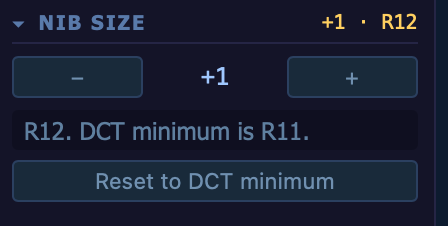
Nib Size
- Choose a larger nib — a new Nib Size section under Nib Height Mode lets you step from the nib DCT recommends to a larger one in the same series, one size at a time — for example from R11 to R12. The Nib Assist panel, the printed sheet and saved designs show the nib you chose with the DCT minimum beneath it, and Reset to DCT minimum returns to the recommendation in one click. Designs saved in the DCT app on iPhone, iPad or Mac with a larger nib open in the web app with it.
- The drawing follows the nib — when the nib changes — a Nib Size step, Reset to DCT minimum, undo, or a size or shape that moves the design to a different nib — the drawing re-fits the canvas by itself, so the OD and Nib Ht labels stay in view without pressing the canvas Fit button. A zoom or pan you have set yourself is kept.
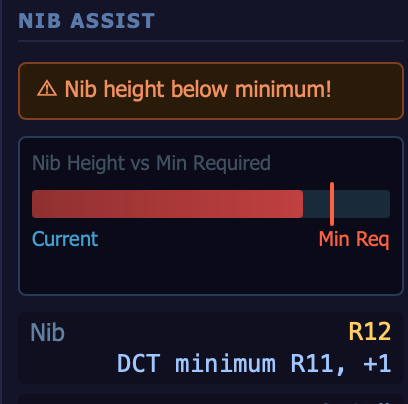
Nib table
- Brought up to the current specification sheets — six nibs now match the drawing die specification sheets on udico.co: R1, R2, R3, R21, SD10H and RD4. Near those sizes DCT may recommend a different nib than before — for example, a 6.200 round finish now gets R21 where it used to get R21.5.
Version
- Version 1.6 — the web app now carries version 1.6, level with the DCT apps for iPhone, iPad and Mac.


