


Introduction
The Die Configuration Tool (DCT) is a browser-based web application for designing and visualizing tungsten carbide drawing dies. It runs directly in your web browser — no software installation required.
The DCT gives you real-time visual feedback as you adjust die geometry, so you can explore configurations, understand the impact of each parameter, and arrive at your optimal design faster.
Interface Overview
The DCT interface is divided into four main areas:
- Header Bar -- File, Install, Preferences, Help, and Feedback buttons
- Left Panel — die parameter and size inputs. Click the Hide ◀ button at the top of the panel to collapse it and give more room to the canvas; click Show to expand it again.
- Drawing Canvas — real-time visualization of the die profile
- Right Panel (Nib Assist) — nib recommendations and incoming shape settings. Click the Hide ▶ button to collapse or expand this panel.

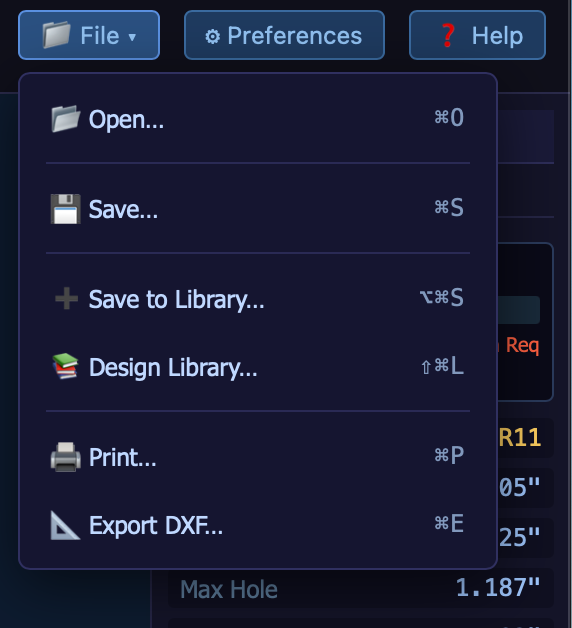
File menu choices
You can open, save, save to library, view the Design Library, print, or export your design to a DXF file.
Entering Sizes
At the top of the left panel, enter your wire sizes in inches:
- Incoming — diameter of the incoming wire or rod
- Finish — the desired finished diameter
Die Parameters
Below the sizes are the core geometric parameters:

Bell Radius — Defines the curvature of the funnel-shaped entry zone that guides wire into the approach. A larger radius creates a more gradual entry and improves lubrication film formation; a smaller radius creates a sharper entry.
Approach Ext — Controls the axial depth of the conical reduction zone. A longer extension provides more contact length and reduces peak pressure; a shorter extension reduces friction but increases peak stress.
Approach Angle — The half-angle of the reduction cone, measured from the wire centerline. This is the most influential parameter for drawing force. Typical range is 4°–12°; softer materials favor smaller angles.
Blend Radius — The transition radius between the approach cone and the bearing land, expressed as a percentage of finish size. Smooths the junction to reduce stress concentration and die wear. Typical range is 5%–25%.
Bearing — The straight cylindrical land where the wire exits at final diameter, expressed as a percentage of finish size. Controls surface finish and size accuracy. Typical range is 25%–100%.
Back Relief — The exit cone angle behind the bearing land. Prevents the trailing edge from scoring the wire surface at exit. Typical range is 30°–60°.
Geometry Quick Reference
- Bell Radius — Entry zone curvature. Affects lubrication film formation.
- Approach Ext — Axial depth of the conical reduction zone.
- Approach Angle — Half-angle of the reduction cone. Most influential for drawing force. Typical: 4°–12°
- Blend Radius — Approach-to-bearing transition. Expressed as % of finish size. Typical: 5%–25%
- Bearing — Straight exit land length. Expressed as % of finish size. Typical: 25%–100%
- Back Relief — Exit cone behind the bearing. Protects wire surface at exit. Typical: 30°–60°
For a detailed explanation of each parameter and its effect on die performance, see the DCT User Manual.
Nib Shape
Select the cross-sectional shape of the die using the Nib Shape buttons: Round, Hex, Square, Rect, or Special.
Nib Height Mode
Toggle between Standard and High nib height mode. Standard covers the conventional nib height range. High allows designs that exceed the standard maximum — useful when additional bearing length is required.
Header Bar
The header bar at the top of the application provides access to core functions:
- File — open or save a configuration, save to or view the Design Library, print, or export your design to a DXF file for use in a CAD program (e.g., AutoCAD, DraftSight, etc.)
- Install — install the DCT as an app on your device for quick access — see Adding DCT to Your Device
- Preferences — opens display, color, and account settings
- Help — opens the in-app help documentation
- Feedback — opens the feedback panel to submit bug reports or feature suggestions directly to the Udico team


